

restray, a system tray GUI for restic

restray, a system tray GUI for restic
restray, go, open-source, backups
(This is, for the most part, a copy of the post I wrote on the restic forum with minor edits)
For various reasons1 I’ve been looking to move away from Time Machine. I also needed to help my brother set up backups for his computer as the other backup programs we tried were just not reliable enough and didn’t work for our use case.
Looking for solutions, I decided to go with restic as I’ve already been using it on my servers for years and absolutely love it. But then I realized I needed some sort of wrapper to make it easier to work with on a desktop OS. I’ve looked at resticprofile and Backrest, and I certainly think they’re great projects! But for my use case, I wanted something even simpler. Like Time Machine if it was instead open-source and cross-platform and modern and Actually Good.
here it is
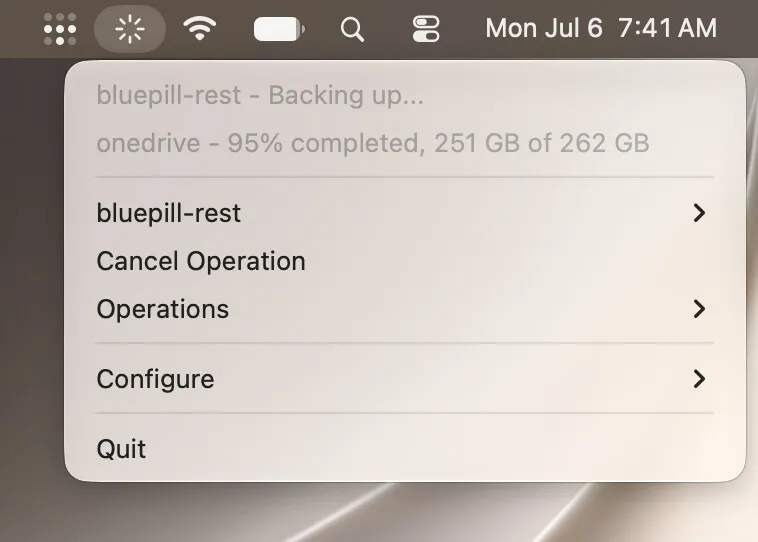
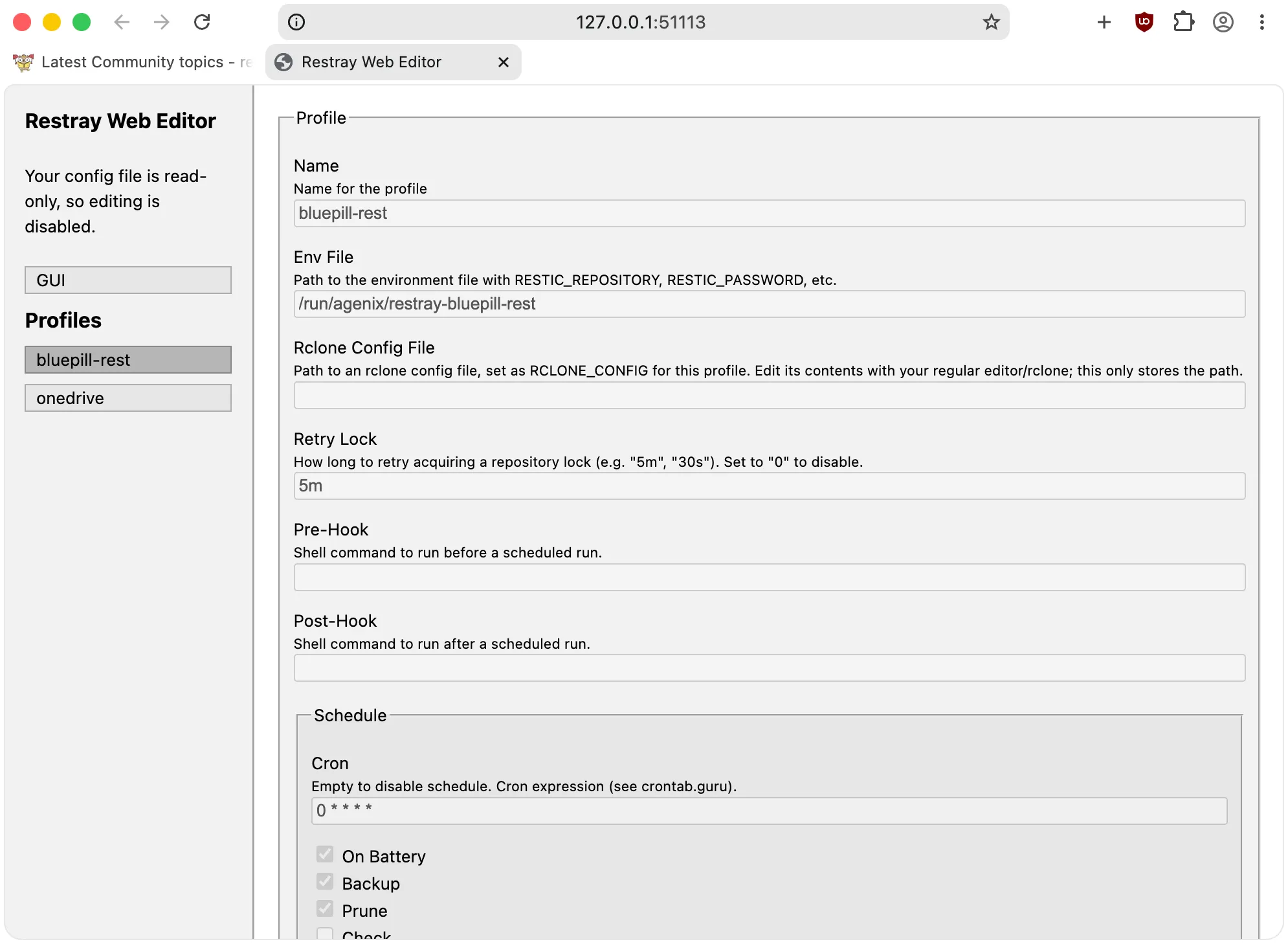
So, I started writing my own wrapper in Go, and called it Restray2. The intent was to make a very simple and intuitive scheduler for restic that can be used on any OS. It sits in the system tray and all of the functionality is accessible through the tray menu. You can configure and set it up through a config file, or optionally use the very barebones web-based editor through your browser.
Other than the browser-based config editor, there is no web tech involved. So, at idle, the app uses just ~30MB memory and little-to-no CPU. That scales when you start a backup of course, since restic does require quite a bit of memory while running. But it’s generally very lightweight.
Here’s a preview of Restray on MacOS, but it also works great on Linux and Windows:
Screenshot of the web editor, but you can also just configure with a text editor of course3:
some cool features
- Simple scheduling, just input a cron expression. To avoid complexity it runs in the background with it’s own scheduler, so you don’t have to deal with Task Scheduler/launchd/systemd/whatever else is out there4
- Restray supports multiple backup profiles, each with their own schedule, environment file, and settings, which can be useful for having both on-site and off-site backups (in my case, rest HTTP server, and OneDrive through rclone)
- If restic is not found in your PATH, on Windows and Linux Restray can self-manage it’s own restic binary from GitHub and update it daily5. The MacOS
.appalso has the latest restic binary bundled at build time - If you need to restore something, on MacOS and Linux you can easily run
restic mountfrom the Operations menu, assuming you have FUSE- I am also working on a cross-platform QT repository browser that will integrate with Restray, however it will be a separate project and program which you can use standalone. As an alternative to the web-based restic-browser. I will post about that later if I ever do end up finishing it.
- Offers a “Shell” operation that lets you instantly drop into your default terminal with the selected profile’s environment file sourced, and restic binary loaded into your PATH, allowing you to do more advanced CLI things without friction. works on Windows too!
- Can be configured to detect whether or not the machine is on battery power, and based on that, pause the schedule.
- Pretty icon animations that I spent a lot of time on for no reason because I was bored
- Config file hot-reloading
- Hooks
- Flexible configuration
- See the README for even more features and config reference
In the future, I also plan on supporting alternative backends, the one I have in mind being rustic for better resource usage and lock-free operations. Maybe Borg too but I’ve never used that personally…
a little disclaimer
While me and my brother have been using Restray for a little while now without issues, this is still pretty new stuff and if you experience any bugs please make an issue and I’ll happily look into it.
ok but how do I get it
For most releases I compile and upload binaries for Windows, Linux, and Darwin (MacOS) and you can get them on this page. If you’re on MacOS, keep in mind that the MacOS app is not signed/notarized so you will need to remove it’s quarantine.
But you can also compile it from source if you’d like, all you need is Go. I also have a Nix package and NixOS module available in the repo’s flake :^)
ok but how do I use it
It should hopefully be relatively straightforward to use for anyone who’s familiar with restic, but I may make a little guide or video in the future on setting it up. Generally all you have to do is run it, configure the repository path and password in the env file, and configure paths, cron schedule, or arguments in the config file.
Releasing this in case someone finds this useful. I’ve been wanting to get into desktop software development for a while (less web dev…) and I’m pretty new to this, so if you have any suggestions on improving Restray, let me know on the issue tracker.
I’m probably going to refrain from adding new features though, since it appears to be mostly feature-complete in my eyes. I want to focus more on refining the UX and codebase where possible though I think it’s in a pretty good state right now.
Here’s a cool landing page I made if you want a summary…
Footnotes
-
Time Machine is not cross-platform, which means I can’t have one consistent backup manager across all of my devices. And Apple is phasing out AFP in the next version of MacOS which means I’d have to use SMB which tends to be slow. Though Time Machine is also just slow in general… And restic is just awesome. ↩
-
waow. restic + tray. what a revolutionary name… ↩
-
In this particular screenshot it says read-only because my config is managed by Restray’s Home Manager module, but if you’re not an insane NixOS user you can just edit it ↩
-
But if you want to, you can! Restray can also be executed through CLI/daemon on Linux/MacOS, see
restray --helpfor a list of commands. But at that point you might just wanna use resticprofile ↩ -
Configurable with the
manage_resticsetting, unavailable in CLI/daemon ↩
comments
wanna comment? reply on bluesky